
Ask How Your ServiceNow Instance Works — Then Update It Safely
Research. Approve. Build.
XpertApps Engineer is a Chrome and Edge browser extension for ServiceNow developers that answers questions about how a live instance is configured, then makes changes through a plan-and-approve workflow — powered by Claude.
One Product, Three Editions
Solo, team, or enterprise — and never on production
Community — Free
For the individual developer. Bring your own Anthropic key, and stay read-only by default so it never touches production. Your key, your account, your data.
Team — $99/dev/mo
For the team. Hub backend, BYO-Claude (your AI gateway, Bedrock, or Vertex), plan-and-approve with scoped update sets and native Revert, basic SSO, and a usage & ROI dashboard. Flat per seat, fair-use — no credits. Launching soon.
Enterprise
For the enterprise. Claude in your own cloud (Bedrock or Vertex) inside your VPC, so data never leaves your infrastructure. Adds SAML, SCIM, RBAC, and audit-log streaming. Custom pricing from ~$199/dev/mo. Launching soon.
See It Working on a Live Instance
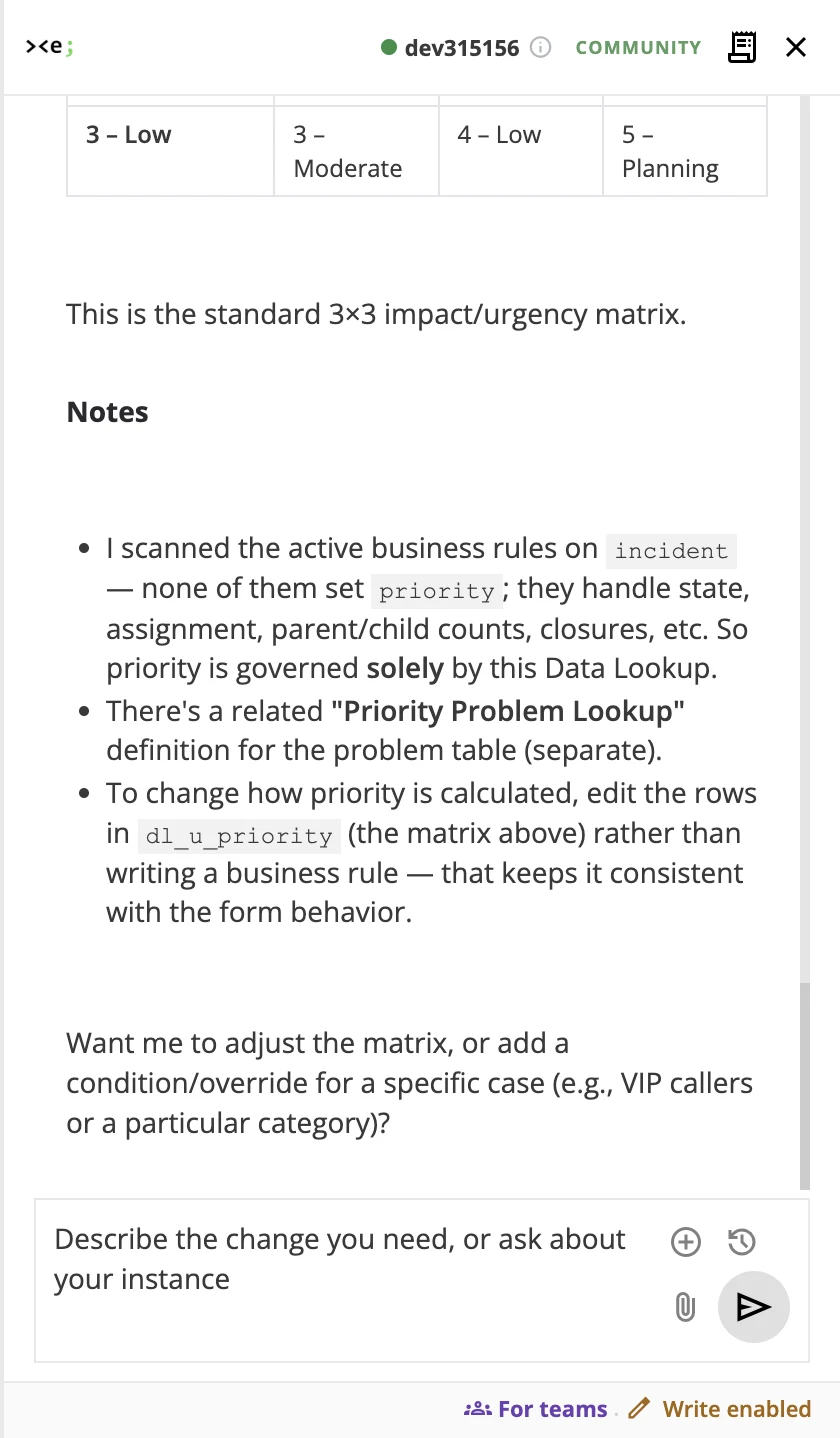
A real ServiceNow instance — not a mockup
Move Faster Without Losing Control
Governance is built in, not bolted on
0
Platform Plugins to Install
Runs as a browser extension on any ServiceNow instance — nothing to install on the platform.
100%
Approved by You
Nothing is created, updated, or deleted without your explicit approval.
0
Passwords Asked For
It rides your signed-in session — no ServiceNow password or key to enter.
What XpertApps Engineer Does
The core build experience — in every edition
Deep Research
Understand Your Instance
Ask anything about your instance. It searches business rules, client scripts, script includes, UI policies, and flows — then traces the connections.
AI Write Mode
Plan & Approve
Create, update, and delete records through a built-in plan-and-approve workflow. Every change requires your explicit approval before it executes.
Change Log & Revert
Full Traceability
Every change is version-tracked and grouped by update set. Undo any change using ServiceNow's native revert mechanisms.
Scoped Update Sets
Isolated & Auditable
Each approved session creates a dedicated update set in the correct application scope, so your changes stay isolated and auditable.
Duplicate Detection
No More Redundant Config
Before creating anything new, it searches existing artifacts and tells you what already exists — so you don't duplicate config.
Powered by Claude
Built on Anthropic's Claude
Built on Anthropic's Claude — the model family XpertApps Engineer uses for its ServiceNow research and code-generation features.
Up and Running in Minutes
Install the extension, connect your AI, and ask your instance anything — then approve changes through a plan-first workflow. No platform plugin to install.
See the Full WalkthroughBuilt for Security-Conscious Teams
Designed to pass your security review
Built by XpertApps (QuoDroid), a ServiceNow Build Partner — 100% app-certification success across 25+ published apps since 2018.
Credential-Free by Design
No ServiceNow password to enter. Engineer rides your signed-in session and your own permissions, and your key stays encrypted under a passphrase only you know.
Minimal Permissions
Asks for the bare minimum — only the current tab and local storage. No tracking, no remote code, nothing routes through XpertApps.
Human in the Loop
Write mode is off by default. Every create, update, or delete is gated behind an explicit plan-and-approve step.
Not Sure Which Edition?
Community, Team, and Enterprise, side by side
Common Questions
Does XpertApps Engineer need my ServiceNow password?
No. Engineer rides your existing signed-in ServiceNow session and works within your own permissions, so there is no ServiceNow password or key to enter. Nothing routes through XpertApps, and your Anthropic key stays encrypted under a passphrase only you know.
Can XpertApps Engineer change production?
Write mode is off by default, so it stays read-only until you turn it on. Every create, update, or delete is gated behind an explicit plan-and-approve step, and each approved session runs in its own scoped update set you can revert using ServiceNow’s native mechanisms.
Which browsers does XpertApps Engineer support?
XpertApps Engineer is a browser extension for Chrome and Edge. It runs on any ServiceNow instance directly in the browser, with no ServiceNow platform plugin to install.
Do I need to install a ServiceNow plugin?
No. Engineer works entirely as a browser extension on your live instance, so there is no platform plugin to install. Install the extension, connect your AI, and start asking your instance questions or approving changes. See how it works for the full walkthrough.
Who supplies the AI for XpertApps Engineer?
It is powered by Anthropic’s Claude. The free Community Edition uses your own Anthropic key, while Team and Enterprise editions can run Claude through your org’s AI gateway, Amazon Bedrock, or Google Vertex—in your own cloud for Enterprise.
What does XpertApps Engineer cost?
Three editions: a free Community Edition (bring your own Anthropic key), Team at $99 per developer per month, and Enterprise with custom pricing from about $199 per developer per month. Team and Enterprise are launching soon. See the full editions and pricing comparison.
Start with the Free Community Edition
Bring your own Anthropic key and build on your dev instance — no account, nothing to manage. For a team, see Team ($99/dev/mo), or talk to us about Enterprise.
Get the Free Community Edition
check_circleFree extension — bring your own key
check_circleWorks on any ServiceNow instance
check_circlePlan & approve on every change
check_circlePowered by Claude